ASK ME ANYTHING ABOUT BREASTFEEDING:Hi all! I'm Joyce, a trained breastfeeding peer counselor. I have a day job and I'...
Posted by Freshcart on Sunday, December 13, 2015
Showing posts with label Facebook. Show all posts
Showing posts with label Facebook. Show all posts
Action,
Baby,
Bloggie,
Breastfeeding,
Events,
Facebook,
Freshcart,
Mood Mania,
People-to-People,
Self-enhancement,
Thoughts,
Universal,
Weekdays
Ask Me Anything slot on Freshcart: 14th Dec, Monday (2pm) - 18th Dec, Friday (6pm)
Monday, December 14, 2015
Action,
Baby,
Bloggie,
Breastfeeding,
Facebook,
Malaysian,
Mood Mania,
People-to-People,
Self-enhancement,
Thoughts,
Universal,
Weekends
The Breastfeeding Advocates Network - Gift of Love Charity Bazaar, 8-9 August 2015
Monday, August 10, 2015Breastfeeding is not a mother's duty; it is a mother's right. - Tommy Tan, TedxKL
Posted by joycescapade.com on Sunday, August 9, 2015
Project 365 2011 - Photo #363
Thursday, December 29, 2011
One good thing about the Facebook Timeline "mayhem" is that you can discover good stuff such as when I became friends with fellow Tweeples after an outing with them called the #twtclub in January 2010. :D
Win Samsung GALAXY Note with DiGi's GILA Smartphone Giveaway Facebook contest
Thursday, December 15, 2011Christmas is approaching and it also means - time for GILA Smartphone Giveaway! Identify your best Ally and team up with him/her to win a PAIR of Samsung GALAXY Note smartphones. It's easy with DiGi!

Project 365 2011 - Photo #314
Friday, November 11, 2011
At 11:11AM this morning, which is also 11-11-11, I manage to "hatch" a PC game with Maybank's Hatch the Egg contest on Facebook and "gift" David with it. This is my third attempt since last week. My first "hatch" was a zebra and my second attempt gave me a banana.
Head on here to "hatch" some eggs!
Note: The contest has ended on 15 December 2011.
U Mobile's promises fulfilled
Thursday, November 10, 2011 31 Oct 2011, 11 AM onwards: U Mobile customers were disappointed by an unexpected nationwide outage that lasted almost five to six hours. Their Facebook and Twitter pages were bombarded with countless questions, disappointed complaints, unhappy remarks, etc.
31 Oct 2011, 11:47 PM: U Mobile posted a video on their Facebook page - U Mobile CEO apologises for service interruption on 31 Oct.
02 Nov 2011, 7:17 PM: U Mobile posted an explanation on their Facebook page. In summary, the outage was caused by an unexpected glitch during the upgrading of their high speed network.
04 Nov 2011, 10:56 PM: I received an SMS from U Mobile with the same content as per their Facebook status posted on 02 Nov. Screenshot below.
 09 Nov 2011, 2:47 PM: I received another SMS from U Mobile - For monthly data package users, you will receive an additional FREE 500MB a month, starting from 10 Nov 2011 until 31 Jan 2012. Screenshot below.
 09 Nov 2011, 4:15 PM: I received another SMS from U Mobile - As promised, enjoy FREE local SMS to all Telco on 10 Nov. Screenshot below.
 09 Nov 2011: The FREE SMS and data reminder was also communicated on their Facebook page.
10 Nov 2011, 7:41 AM: I received an SMS notification that U Mobile has added 500MB to my data plan gradually this morning.
 Good stuff I suppose.

Project 365 2011 - Photo #240
Sunday, August 28, 2011
One of the beauty products that jerinelay.com provided for giveaways in August 2011 was Benefit Triple Performing Facial Emulsion and I was the chosen winner - the number 13th person who liked her Facebook page! :D
Benefit Triple Performing Facial Emulsion contains SPF 15 and it's suitable to be used under makeup during the day. It also hydrates, protects, and comforts the skin with an oil-free, lightweight formula. Contains exclusive ultra moisturizing tri-radiance complex to help capture and maintain water on the skin's surface.
Thanks Jerine!

Project 365 2011 - Photo #179
Tuesday, June 28, 2011
I received this letter from DiGi.
Congratulations!
You are one of the Consolation Prize Winners of "DiGi April Comic Strip" contest!
You have won yourself:
Fila Waist Pouch voucher at RM26 (Normal Price: RM59)
Once again, thank you for your continuous support to DiGi and stay tuned for more great offers from DiGi. Congratulations again!
"Stay active with DiGi for more delightful surprises in the future!"
Project 365 2011 - Photo #123
Tuesday, May 3, 2011
From 03 till 16 May 2011, voice out your opinion on DiGi's "Running Bob" Facebook app contest and get rewarded with merchandises from the Merchant of the Month - FILA!
Windows Phone 7: Make It Mine Contest
Thursday, November 11, 2010 Windows Phone Malaysia is currently running a Windows Phone 7: Make It Mine contest! Your Windows Phone 7 is just a click away when you join and create a buzz!
Join now and win a brand new HTC HD7!
- "Like" the Windows Phone Malaysia Facebook page.
- Click the "Contest" tab.
- Click "Join Now" on the contest introduction page (as per screenshot above).
- Click the "Enter Contest" button on the contest page.
- Post your contest entry as many times you like on your Facebook wall and get your friends, family members, and whoever you know to support you by clicking the "Support" button.
- The person with the most support will win a HTC HD7.
Hurry! Contest ends 15 November 2010.
Click here to view the compilation of my Windows Phone 7 posts.
Save Social Energy (3) -- Windows Live Messenger 2011
Tuesday, October 26, 2010 Here we come again. Let's talk about saving social energy. Undoubtedly and honestly speaking, we're spending more and more time each day on social networks. The catch is how do we spend our time and energy more efficiently so that we can balance work, social networking, and other lifestyle requirements effectively?
I'm impressed with Microsoft's Windows Live Messenger 2011. You can read, post, share, and interact on Facebook and other networking sites through this NEW Messenger. They call it -- the ultimate social dashboard. So, I don't have to launch multiple tabs on my web browser to view different streams of my social network feeds. Save the clutter but I still can chatter! :)
******************************
Let's see how to streamline my social networking sites with Windows Live via the Windows Live Messenger interface.
 From the screenshot above, you can see that I've upgraded my Windows Live Messenger (WLM) to the 2011 (NEW) version. You can do so by downloading and installing Windows Live Essential 2011 pack.
Note: Kindly ignore the Chinese girl visual on the right. That's not part of the new WLM window but my wallpaper from Reggie Lee's Merdeka theme pack. :)
Then, I've decided to link my Facebook account to my Windows Live account. You can do so my clicking the "Add" button at the bottom right corner of your WLM window.
 You'll see the prompt to connect Facebook to Windows Live as above. Adjust the settings to suit your preference by checking and/or un-checking the boxes. Once done, click "Connect with Facebook".
 Then, you'll be prompted to log in to your Facebook account once you click "Connect with Facebook", as explained earlier on. Click "Login" to proceed.
 You'll familiar with the "Request for Permission" screenshot above. Click "Allow" to proceed.
 Voila! The "Facebook" icon appears at the bottom right corner of my WLM window.
 For final touch-ups, log in to your Windows Live account and adjust the settings. Click "Save".
 Now, you can see the list of your connected services. At the moment, I'm connected to Facebook. :)
******************************
Note: No integration with Twitter yet. Hopefully Microsoft will come up with something to do with Twitter in the near future.
******************************
Visit Windows Live Essentials 2011 for download.
By the way, do visit savesocialenergy.com or facebook.com/savesocialenergy for more information about saving social energy.
******************************
Update:
Click here to view the compilation of my Save Social Energy posts.
A good article to read:
Integrate your existing Social networks with the new Windows Live Messenger
Facebook's "Photo Memories" feature is crap
Monday, September 27, 2010 One of my recent Facebook statuses is this: "I officially declare my HATRED towards Facebook's "Photo Memories" feature that appears on the top right navigation bar when you're viewing your own or others' Facebook albums."
Note: The said feature is highlighted in a red box in the screen capture above.
Why? The reason is so darn simple. I hate to see photos that bring back bad memories being displayed randomly anytime they like. I don't see the need to display photos from ages ago just to get people ticked off!
One friend commented that this isn't her favorite feature either and she wonders if there's a "Hide" button available, to which I reply:
"Even if there's a 'Hide' button, it doesn't hide the fact that the feature is still active on others' Facebook pages. I came up with a few not-so-courteous solutions:
1. Un-tag yourself from photos that you don't like to be tagged.
2. Ask the fella who's tagged in photos that you hate to see in whosoever's album to un-tag himself and/or herself.
3. Ask the whosoever who posted photos of whosoever you hate to delete those photos from those albums.
Note: Problem is... I haven't implemented the above solutions yet. To be more accurate, I don't have the guts to do so... yet. :("
Hmmpphh! Facebook has nothing better to do, is it?
Project 365 - Photo #54
Tuesday, February 23, 2010
This is my submission to Tetra Pak's Roaring Tiger, Loving Cartons Contest.
The story behind the photo: "Red angpow, red top, red table fan, ah well... purplish-red Ribena packet drink, with Tetra Pak at the bottom. Post CNY blues..."
To vote: http://apps.facebook.com/tetra_pak_cny/DisplayItem.aspx?itemID=53913d05-f405-4b2f-8b13-8ddea2010759
Nice? Vote-lah...
Windows 7 Malaysia Movement :: Get Engaged via Contests
Wednesday, October 21, 2009
Are you counting down to the official launch of Windows 7? No doubt, I am! However, in the midst of counting down to that day, I find it very interesting to get engaged in and move among the crowd of Windows 7 fans / lovers as the tidal wave of Windows 7 Malaysia movement keeps us buoyant and excited with numerous FUN contests that come with BIG prizes!
The interesting thing is this. The contests are conducted via these three main channels: Windows 7 Malaysia Website, Windows 7 Malaysia Facebook Fan Page, and Windows 7 Malaysia Twitter Page. I'm online almost 24/7 and a hyperactive Twitter and Facebook user. Participating in any of the current running contests is fun, easy, and hassle-free!
Another point of observation is this. These online contests have become a ground of get-togetherness. Why would I say so? The participants, either via Facebook or Twitter, who have been strangers before, are brought together into numerous online or even offline discussions, info sharing, and network building. Such is a good way to reach out and to garner trust and mutuality amidst the online society pertaining to the brand itself, i.e. Windows 7 Malaysia.
 Ultimate Re-Tweet Contest

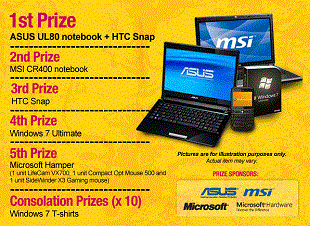
Watch our 7 Everyday People videos and share it on Facebook by posting them on Win Seven Facebook wall to win an Asus Notebook or a HTC Snap phone!
Details here (Click Facebook Share and Win tab).
**********************************************************
 The Windows® 7 Web Hunt
Collect weekly clues and stand a chance to walk away with BIG prizes!
 Follow @win7malaysia for bonus tips on clues!
Details here (Click The Windows® 7 Web Hunt tab).
Get the clues now!
**********************************************************
 The "7 & Me Photography Contest
2
The interesting thing is this. The contests are conducted via these three main channels: Windows 7 Malaysia Website, Windows 7 Malaysia Facebook Fan Page, and Windows 7 Malaysia Twitter Page. I'm online almost 24/7 and a hyperactive Twitter and Facebook user. Participating in any of the current running contests is fun, easy, and hassle-free!
Another point of observation is this. These online contests have become a ground of get-togetherness. Why would I say so? The participants, either via Facebook or Twitter, who have been strangers before, are brought together into numerous online or even offline discussions, info sharing, and network building. Such is a good way to reach out and to garner trust and mutuality amidst the online society pertaining to the brand itself, i.e. Windows 7 Malaysia.
Let's make a quick recap.
Windows 7 Contest Madness!
 Ultimate Re-Tweet Contest
Round One for Ultimate Re-Tweet Contest has ended and the winner has been revealed.
Round 1 Winner: @ckkoay (I want Windows 7 because uʍop ǝpısdn uoıʇıʇǝdɯoɔ ǝɥʇ 11ɐ sdı1ɟ ʇı ʇɐɥʇ ʇsɐɟ ʎ1buıpuıq11ǝds os sı ʇı)
Round Two is ON!

Round 1 Winner: @ckkoay (I want Windows 7 because uʍop ǝpısdn uoıʇıʇǝdɯoɔ ǝɥʇ 11ɐ sdı1ɟ ʇı ʇɐɥʇ ʇsɐɟ ʎ1buıpuıq11ǝds os sı ʇı)
Round Two is ON!

**********************************************************

Facebook Share and Win
Watch our 7 Everyday People videos and share it on Facebook by posting them on Win Seven Facebook wall to win an Asus Notebook or a HTC Snap phone!
Details here (Click Facebook Share and Win tab).
**********************************************************
 The Windows® 7 Web Hunt
Collect weekly clues and stand a chance to walk away with BIG prizes!
 Follow @win7malaysia for bonus tips on clues!
Details here (Click The Windows® 7 Web Hunt tab).
Get the clues now!
**********************************************************
 The "7 & Me Photography Contest
Get creative and upload a photo of yourself with the number 7. Photo with the most "Likes" wins an Asus Notebook!
Details here (Click The "7 & Me" Photography Contest tab).
Upload your photos now and win!
Details here (Click The "7 & Me" Photography Contest tab).
Upload your photos now and win!
**********************************************************
What Would I Give for a Windows 7 Notebook
Share what you would give up in exchange for a Windows 7 Notebook and you could win one for yourself! Share now and win!
Share what you would give up in exchange for a Windows 7 Notebook and you could win one for yourself! Share now and win!
**********************************************************
Time and tide waits for no man. Don't miss! Join in the revolution and fun today!
P.S.: Images in this post are snipped from Windows 7 Malaysia's website with Windows 7's nifty Snipping Tool. Love it!
P.S.: Images in this post are snipped from Windows 7 Malaysia's website with Windows 7's nifty Snipping Tool. Love it!
Windows 7 Malaysia | Blogs & Ultimate Re-Tweet Contest
Thursday, October 1, 2009Windows 7 Malaysia | Blogs

Here's my first post about Windows 7 Malaysia: What's Windows 7 Malaysia? Moving forward, I shall share more about how I'm Win7-ed, Se7en-fied, etc.
Win 7 for the WIN!
******************************
Windows 7 Malaysia | Ultimate Re-Tweet Contest
For Twitterers, check out what others tweet about Windows 7 Malaysia live stream here.
OR
Visit win7.com.my, right click on the Silverlight Twitter feed application, and install it to your machine to easily monitor the feed. See screenshot below to view how the feed application will look like.

This is pretty handy if you want to "spy-tweet" what others tweet about Windows 7 Malaysia and out-win them by producing your own creative re-tweets. :D
Why? Well, by doing this, you stand the chance to win yourself a copy of Windows 7 Ultimate when you're participating in Windows 7 Malaysia's Ultimate Re-Tweet Contest!
For more details plus terms & conditions about the contest, click "What's Hot?" when you're on the site.
Have loads and loads of fun!!!
Action,
Bloggie,
Contests,
Facebook,
Malaysian,
Microsoft,
Self-enhancement,
Twitter,
Windows 7 Malaysia
What's Windows 7 Malaysia?
Monday, September 28, 2009
I like NEW things, especially those that challenge me intellectually. So, I spent some time reading up what's so BIG DEAL about Microsoft Windows 7. I'm not a techie, definitely, and until today, geeky and complicated technical jargons and their mumbo-and-jumbo still "haunt" me... :P

My laptop is still running on Windows XP. It seems that I might have the chance to get it upgraded to Windows 7, the latest OS from Microsoft.
Okay, let me go straight to the point.
On My Blog
I've allocated a permanent slot and updated necessary Windows 7 Malaysia links on my the right navigation bar of my blog for easier reference.
Links About Windows 7 Malaysia
 Join the revolution and check out Windows 7 Malaysia!
1. Website
* Windows 7 Malaysia: The movement, conversations, contests
2. Twitter
* Follow Windows 7 Malaysia on Twitter
* Do include this hashtag: #win7my when you're tweeting about Windows 7 Malaysia. Let's make it a trending topic on Twitter!
* You may find real-time results for #win7my hashtag here.
3. Facebook
* Be a fan of Windows 7 Malaysia on Facebook
* Be a friend of Windows 7 Malaysia on Facebook
3 Things I Like on win7.com.my
When you scroll down, you'll find these 3 things (highlighted in pale pink boxes):
1. Share your thoughts & experiences about Windows 7 and they'll be cross-posted on your Facebook wall.

2. Follow Twitter updates of @win7malaysia & #win7my hashtag stream.

3. Sign in to Window's Live Messenger's web version.

Next Step
Get Windows 7 installed on my working machine. :)
20

My laptop is still running on Windows XP. It seems that I might have the chance to get it upgraded to Windows 7, the latest OS from Microsoft.
Okay, let me go straight to the point.
On My Blog
I've allocated a permanent slot and updated necessary Windows 7 Malaysia links on my the right navigation bar of my blog for easier reference.
Links About Windows 7 Malaysia
 Join the revolution and check out Windows 7 Malaysia!
1. Website
* Windows 7 Malaysia: The movement, conversations, contests
2. Twitter
* Follow Windows 7 Malaysia on Twitter
* Do include this hashtag: #win7my when you're tweeting about Windows 7 Malaysia. Let's make it a trending topic on Twitter!
* You may find real-time results for #win7my hashtag here.
3. Facebook
* Be a fan of Windows 7 Malaysia on Facebook
* Be a friend of Windows 7 Malaysia on Facebook
3 Things I Like on win7.com.my
When you scroll down, you'll find these 3 things (highlighted in pale pink boxes):
1. Share your thoughts & experiences about Windows 7 and they'll be cross-posted on your Facebook wall.


2. Follow Twitter updates of @win7malaysia & #win7my hashtag stream.

3. Sign in to Window's Live Messenger's web version.

Next Step
Get Windows 7 installed on my working machine. :)
Subscribe to:
Posts (Atom)