Contact Me

Contact Me
Contact Me

Working Mom Blogger

Working Mom Blogger
Working Mom Blogger

Health & Wellness

Health & Wellness
Health & Wellness


Showing posts with label Windows 7 Malaysia. Show all posts

Project 365 2011 - Photo #224

Porcelain-babies

I don't know about you but I find these porcelain-looking baby dolls images kinda disturbing. They appear as one of the few desktop backgrounds from the Windows 7 Aero (Characters) theme that I set on my current work laptop. Haha.

0

Project 365 2011 - Photo #172

Windows 7 T-shirts in 3 colors - green, red, blue. I didn't get the black one though.
0

Good things come with Microsoft

Microsoft releases the latest Mac version of the most popular productivity suite -- Office for Mac 2011 worldwide on 26 October 2010. In Malaysia, the launch is held at La Bodega Deli at Bangsar Baru. I'll write about the product in a separate post.

Update: Microsoft Office for Mac 2011 -- Compatible, Familiar, Professional


For now, let me share about some pretty good stuff that transpired during the event, apart from the live demo of Office for Mac 2011. :)


Windows 7 celebrates its 1st birthday this month, October.

Happy 1st Birthday, Windows 7!


A cute cupcake decorated with a "Happy 1st Birthday" shout-out to Windows 7.

Each attendee received a limited edition Windows 7 T-shirt from GAP as a door gift.

And I was lucky enough to be one of the lucky ones to get this Microsoft Comfort Mouse 4500 from the lucky draw. ^^
0

Experiencing Windows 7's desktop shuffling

Just in case you aren't aware of the newly launched Windows of Malaysia Themes for Windows 7 by Reggie Lee, here are the screen captures of the seven themes from my laptop that runs on Windows 7.

Windows 7 supports the function of displaying multiple pictures as desktop backgrounds which shuffle periodically. IMHO, this feature is very cool as I always find my desktop backgrounds in a "refreshed" state from time to time.

Interested? Download the theme pack from
http://www.win7.com.my/Downloads/Themes/

Once you're done with downloading, according to my experience, this theme pack will be automatically installed as your default theme and desktop shuffling is turned on as well.

If you wish to change this setting, revert to your previous theme or create new themes deriving from this theme pack, please go to Control Panel > Personalization and proceed with changes under My Themes.


Have fun!!!

0

Windows 7, Malaysia & Me Design Contest for Students

In conjunction with the nation's 53rd Merdeka Day on 31 August 2010, Microsoft Malaysia is calling all Malaysians to show our love for Malaysia.

Let's celebrate Merdeka Day with Windows of Malaysia Themes for Windows 7 by Reggie Lee.
This special activity is commemorated during a heartwarming event with the presence of Reggie Lee, Windows 7 team @ Microsoft Malaysia, media, and some of the members of the Windows 7 community at Imperial Chakri Palace, KLCC last Thursday, 26 August. You may download the themes from http://www.win7.com.my/Downloads/Themes/

If you're a Malaysian college or university student, the Windows 7, Malaysia & Me design contest is created especially for you! Show your love for Malaysia and build a uniquely Malaysia Windows 7 theme based on your Merdeka Day inspirations.

"Through the Windows 7, Malaysia & Me contest, Microsoft Malaysia is looking to inspire creativity and create new opportunities for talented Malaysian students. We invite students who are passionate about design, to share their Merdeka inspired designs with all Malaysians," said Yong Yu Tsing, Microsoft Malaysia's Windows Client Product Marketing Manager.

You may submit your entries to http://www.win7.com.my and they will be judged by a panel of judges headed by one of Malaysia's best loved Malaysian artists, the one-and-only Reggie Lee! The student with the winning theme will walk away with a 42" Panasonic LCD TV and an Asus netbook. Other prizes include Acer LCD Monitors, HTC Phones, and Windows 7 Ultimate software.

Contest Period: 26 August 2010 - 26 September 2010

So hurry up and share your creativity with the rest of Malaysia!

For more information on contest details, please visit Windows 7, Malaysia & Me Contest page. Also, do join the Windows 7 Malaysia conversation on Facebook and Twitter.
0

Windows 7 Merdeka Day Themes by Reggie Lee

In celebration of the nation's 53rd Merdeka Day, Microsoft Malaysia has tapped into the wit and creativity of celebrated cartoonist Reggie Lee to introduce seven unique Merdeka-inspired Windows 7 themes.

On 26 August 2010 (Thursday), the Windows 7 Team @ Microsoft Malaysia invited the media as well as some of the members of the Windows 7 community to an event at Imperial Chakri Palace, KLCC in conjunction of the launch of these new and exclusive Windows 7 Merdeka Day themes to the public.

We're excited to be able to meet Reggie Lee (right) in person. Microsoft Malaysia's Windows Client Product Marketing Manager, Yong Yu Tsing (left) said, "Microsoft Malaysia is pleased to collaborate with a home-grown icon like Reggie Lee. We are confident his distinctive designs and clever reflections of Malaysian life would appeal to Malaysians across the board."

"It's an honor to share my interpretation of the Malaysian lifestyle and what independence means for us through Windows 7," said Reggie Lee at the unveiling of the exclusive Windows 7 Merdeka Day Themes which comes in seven designs.


The Merdeka-inspired Windows 7 theme designs by Reggie Lee are available for download at the Microsoft Malaysia website in time for the Merdeka Day celebrations on 31 August.
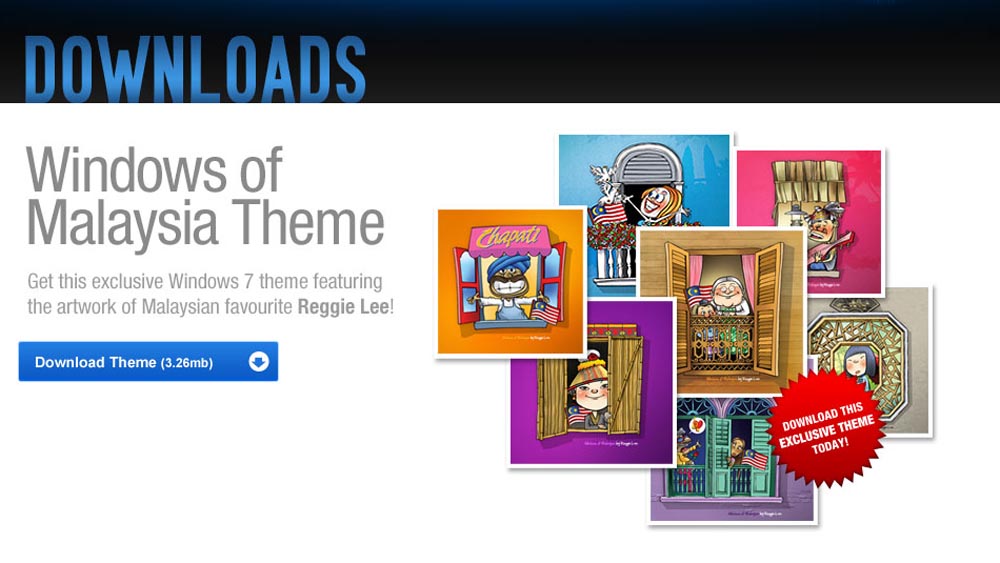
Click on the "Download Theme" tab on the Downloads page to download these exclusive themes today!

For more information, do join the Windows 7 Malaysia conversation on Facebook and Twitter.

******************************


The T-shirt (door gift) and the 4GB thumbdrive (media gift) bear the Windows 7 logo.

THANK YOU to the Windows 7 Team @ Microsoft Malaysia for the invitation!

CONGRATULATIONS on the launch of the exclusive Windows 7 Merdeka Day Themes!

*** downloading themes in progress ***

:)
0

Project 365 - Photo #66

The red Windows 7 T-shirt is in good hands. David looks good in it. :)

0

I have a "7" T-shirt

I was at IKANO during lunch hour for @win7malaysia's Windows 7 Roadshow 2 and was luckily chosen to participate in a game session. It's called the "take-turn-to-recite-1-2-3-but-change-all-number-7-related-numbers-to-Windows 7" contest. There were 3 participants. :)


And I got the Windows 7 Limited Edition T-shirt! The RED one!

Photos courtesy of @win7malaysia.


Actually, you just need to pay a visit to Windows 7 Malaysia's Consumer Launch Roadshows at different locations.

Then, make sure:

1. You "stalk" any of the lengzai & lenglui clad with Windows 7 T-shirt and get a Windows 7 sticker from them.

2. You participate in the on-ground games and contests and you'll be lucky enough to get your hands on one of those T-shirts. :)

3. You check out Live Twitterboard.

4. You check out booths of participating partners.

More photos, click here.

Check out Windows 7 Malaysia's What's Happening - Launch events & roadshows page on win7.com.my for more details.

Have fun!

Don't forget this Saturday, 7 Nov 2009, at Low Yat Plaza, Kuala Lumpur. See you there!
2

Windows 7 Malaysia Movement :: Get Engaged via Contests

Are you counting down to the official launch of Windows 7? No doubt, I am! However, in the midst of counting down to that day, I find it very interesting to get engaged in and move among the crowd of Windows 7 fans / lovers as the tidal wave of Windows 7 Malaysia movement keeps us buoyant and excited with numerous FUN contests that come with BIG prizes!

The interesting thing is this. The contests are conducted via these three main channels: Windows 7 Malaysia Website, Windows 7 Malaysia Facebook Fan Page, and Windows 7 Malaysia Twitter Page. I'm online almost 24/7 and a hyperactive Twitter and Facebook user. Participating in any of the current running contests is fun, easy, and hassle-free!

Another point of observation is this. These online contests have become a ground of get-togetherness. Why would I say so? The participants, either via Facebook or Twitter, who have been strangers before, are brought together into numerous online or even offline discussions, info sharing, and network building. Such is a good way to reach out and to garner trust and mutuality amidst the online society pertaining to the brand itself, i.e. Windows 7 Malaysia.

Let's make a quick recap.

Windows 7 Contest Madness!

Ultimate Re-Tweet Contest

Round One for Ultimate Re-Tweet Contest has ended and the winner has been revealed.
Round 1 Winner: @ckkoay (I want Windows 7 because uʍop ǝpısdn uoıʇıʇǝdɯoɔ ǝɥʇ 11ɐ sdı1ɟ ʇı ʇɐɥʇ ʇsɐɟ ʎ1buıpuıq11ǝds os sı ʇı)

Round Two is ON!

**********************************************************


Facebook Share and Win

Watch our 7 Everyday People videos and share it on Facebook by posting them on Win Seven Facebook wall to win an Asus Notebook or a HTC Snap phone!

Details here (Click Facebook Share and Win tab).

**********************************************************


The Windows® 7 Web Hunt

Collect weekly clues and stand a chance to walk away with BIG prizes!

Follow @win7malaysia for bonus tips on clues!

Details here (Click The Windows® 7 Web Hunt tab
).
Get the clues now!


*
*********************************************************


The "7 & Me Photography Contest

Get creative and upload a photo of yourself with the number 7. Photo with the most "Likes" wins an Asus Notebook!

Details here (Click The "7 & Me" Photography Contest tab).
Upload your photos now and win!


**********************************************************

What Would I Give for a Windows 7 Notebook

Share what you would give up in exchange for a Windows 7 Notebook and you could win one for yourself! Share now and win!


**********************************************************

Time and tide waits for no man. Don't miss! Join in the revolution and fun today!


P.S.: Images in this post are snipped from Windows 7 Malaysia's website with Windows 7's nifty Snipping Tool. Love it!
2

Windows 7 Malaysia | Blogs & Ultimate Re-Tweet Contest

Windows 7 Malaysia | Blogs

For your daily doses of Windows 7 Malaysia, check out What Others Say About 7.


Here's my first post about Windows 7 Malaysia: What's Windows 7 Malaysia? Moving forward, I shall share more about how I'm Win7-ed, Se7en-fied, etc.

Win 7 for the WIN!

******************************

Windows 7 Malaysia | Ultimate Re-Tweet Contest

For Twitterers, check out what others tweet about Windows 7 Malaysia live stream here.

OR


Visit win7.com.my, right click on the Silverlight Twitter feed application, and install it to your machine to easily monitor the feed. See screenshot below to view how the feed application will look like.


This is pretty handy if you want to "spy-tweet" what others tweet about Windows 7 Malaysia and out-win them by producing your own creative re-tweets. :D

Why? Well, by doing this, you stand the chance to win yourself a copy of Windows 7 Ultimate when you're participating in Windows 7 Malaysia's Ultimate Re-Tweet Contest!

For more details plus terms & conditions about the contest, c
lick "What's Hot?" when you're on the site.

Have loads and loads of fun!!!

2

What's Windows 7 Malaysia?

I like NEW things, especially those that challenge me intellectually. So, I spent some time reading up what's so BIG DEAL about Microsoft Windows 7. I'm not a techie, definitely, and until today, geeky and complicated technical jargons and their mumbo-and-jumbo still "haunt" me... :P


My laptop is still running on Windows XP. It
seems that I might have the chance to get it upgraded to Windows 7, the latest OS from Microsoft.

Okay, let me go straight to the point.


On My Blog

I've allocated a permanent slot and updated necessary Windows 7 Malaysia links on my the right navigation bar of my blog for easier reference.


Links About Windows 7 Malaysia

Join the revolution and check out Windows 7 Malaysia!

1. Website
* Windows 7 Malaysia: The movement, conversations, contests

2. Twitter
* Follow Windows 7 Malaysia on Twitter

* Do include this hashtag: #win7my when you're tweeting about Windows 7 Malaysia. Let's make it a trending topic on Twitter!

* You may find real-time results for #win7my hashtag here.

3. Facebook
* Be a fan of Windows 7 Malaysia on Facebook
* Be a friend of Windows 7 Malaysia on Facebook


3 Things I Like on win7.com.my

When you scroll down, you'll find these 3 things (highlighted in pale pink boxes):

1. Share your thoughts & experiences about Windows 7 and they'll be cross-posted on your Facebook wall.


2. Follow Twitter updates of @win7malaysia & #win7my hashtag stream.


3. Sign in to Window's Live Messenger's web version.


Next Step


Get Windows 7 installed on my working machine. :)
20